Inside Recruiting Atelier: a runnable reference for the primitives of an agentic system
A working open studio that vets duplicates, plans the run, screens, scores, shortlists, and notifies. The whole pipeline lives in roughly ninety lines of supervisor code and a tool registry you can read in one sitting. Here is what is inside, why every piece is there, and what you can copy into your own stack.
 Jigar JoshiAgentic AI Architect and Consultant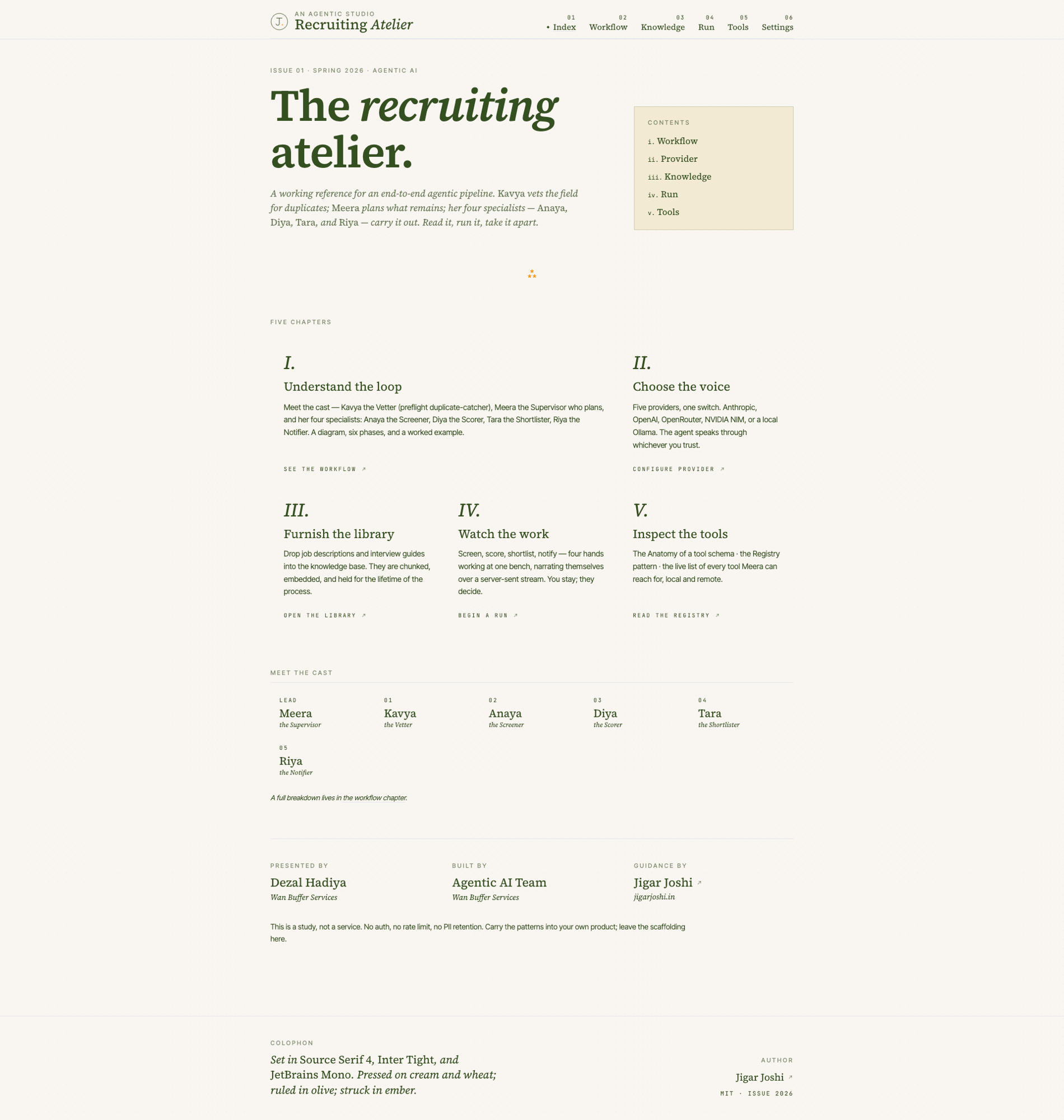
In this post (9 sections)
I keep getting the same question from teams that are sitting in front of LangGraph for the second week running and still cannot explain what their agent is doing. The frameworks ship with a level of abstraction that hides the thing they are trying to learn. So I built a studio that strips the abstraction off and shows the moving parts. It is called Recruiting Atelier. It screens resumes, scores candidates on four dimensions, and surfaces a ranked shortlist. The pipeline is autonomous. The interface is intentionally not.
This post is a walkthrough of the codebase from an architecture point of view. If you are building a production agentic system and you want to see every primitive (planner, ReAct loop, multi-agent dispatch, tool registry, RAG, MCP, guardrails, observability) wired up in plain Python and Next.js, the repo is a useful reference. The HR-shaped framing is incidental. Swap the agents for ticket triagers, claim adjusters, or anything else with a clean input and a ranked output, and the same scaffolding works. If you want the upstream framing question first, the post on AI agent vs agentic AI lays out the three-question test I use to scope every engagement before any code gets written.
What Recruiting Atelier actually is
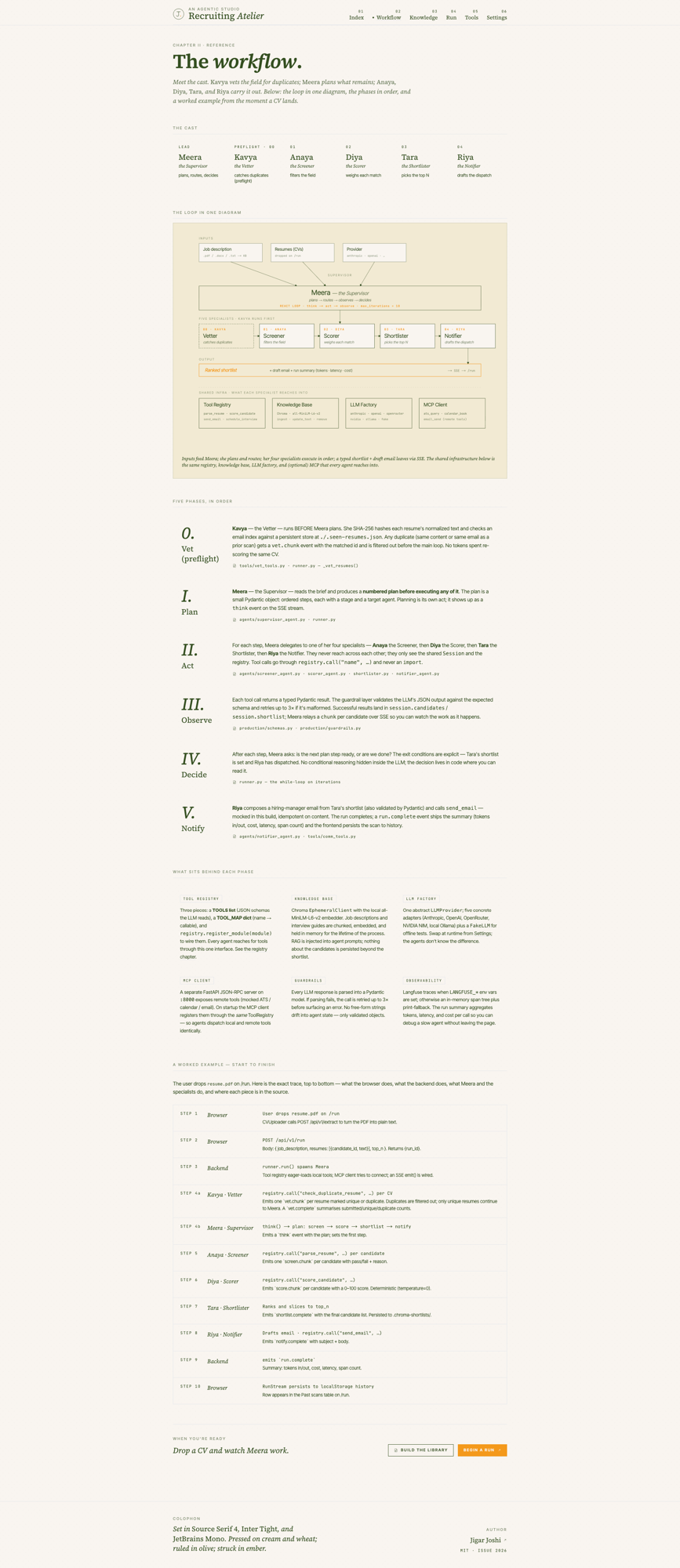
Pull the repo, run make dev, and three services come up. A FastAPI HTTP API on port 1812. A separate MCP server on 1813. A Next.js 14 frontend on 3000. Open the home page and you land on a magazine cover with six chapters: index, workflow, knowledge, run, tools, settings. Read the workflow chapter first. The diagram is a single inline SVG, the kind you can copy into a notebook and explain in five minutes.
The cast does the work. Meera plans. Kavya catches duplicates before the main loop ever fires. Anaya screens against the job description. Diya scores on four dimensions. Tara ranks and shortlists. Riya drafts the dispatch email. Each one is a small Python module with a Pydantic schema at the boundary and a single LLM call inside. The supervisor (Meera) routes work between them.
Most agent demos either skip planning (the model picks tools in a tight loop until it gives up) or skip auditability (you cannot tell after the fact why the model chose what it chose). The studio refuses both shortcuts. Meera produces a numbered step plan before executing any of it. Every LLM call validates output against a Pydantic schema and retries up to three times. Every agent invocation is a structured event you can replay.
The cast, and what each agent is responsible for
Six agents. One lead, one preflight check, four specialists. The split is deliberate. Each agent does one thing, holds one contract, and never reaches into another agent’s state.
Splitting the work this way is what makes the system legible. Anaya does not know how Diya scores. Diya does not know what Tara’s top N policy is. Each contract is a Pydantic model, mirrored in Zod on the frontend. The frontend cannot fall out of sync with the backend without the build breaking, which is the entire point of typed boundaries.
The ReAct loop, in roughly ninety lines
backend/runner.py is the heart of the studio. It is around ninety lines of plain Python. It implements the ReAct loop you can read in five minutes: receive task, ask the supervisor to plan, dispatch the next step to a specialist or a tool, observe the result, repeat until done or the iteration cap fires.
That is what LangGraph compiles down to. Use a framework in production if it fits your team, but learn the primitives here first. If you understand this file, you understand how every agentic framework on the market does its dispatch underneath the abstractions.
# A flattened sketch of the dispatch loop
plan = supervisor.plan(task, context)
for step in range(MAX_ITERATIONS):
    action = supervisor.next(plan, observations)
    if action.kind == "stop":
        break
    if action.kind == "tool":
        result = registry.call(action.name, **action.params)
    elif action.kind == "agent":
        result = agents[action.name].run(action.input, session)
    observations.append(Observation(action=action, result=result))
return finalise(observations)
A few details matter. MAX_ITERATIONS is a hard upper bound (default ten). The supervisor decides when to stop, not the loop. Every tool and agent call is reified into an Observation that lands in shared session state, so the next planning step has a complete history. Stream the observations to the browser over Server Sent Events and the user watches the work happen in real time.
The tool registry pattern
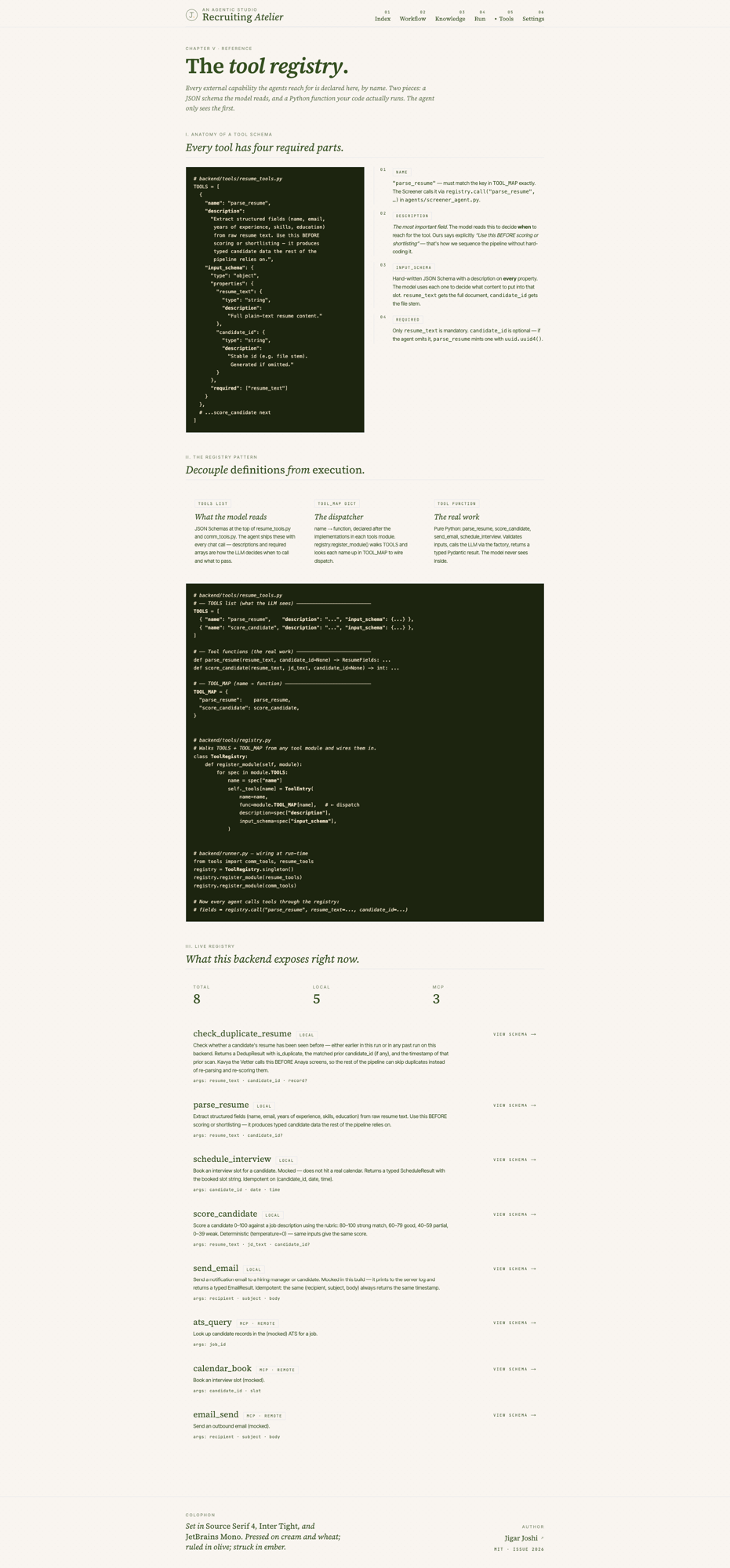
Every tool in the repo follows the same four part shape. A TOOLS list with hand written JSON Schema. Plain Python functions. A TOOL_MAP dict that points names at functions. A single register_into(registry) call at startup.
# 1. TOOLS list — what the LLM sees
TOOLS = [
    {
        "name": "parse_resume",
        "description": "Extract structured fields. Use BEFORE scoring.",
        "input_schema": {
            "type": "object",
            "properties": {
                "resume_text": {"type": "string"},
                "candidate_id": {"type": "string"}
            },
            "required": ["resume_text"]
        }
    }
]

# 2. Tool functions — the real work
def parse_resume(resume_text, candidate_id=None):
    ...

# 3. TOOL_MAP dict — what your code runs
TOOL_MAP = {"parse_resume": parse_resume}

# 4. Register at startup
def register_into(registry):
    import sys
    registry.register_module(sys.modules[__name__])
ToolRegistry.register_module walks module.TOOLS, looks each name up in module.TOOL_MAP, and stores (name, function, description, input_schema) in a singleton. Every agent calls tools through the registry. None of them import tool functions directly. This sounds like extra ceremony until you have shipped two systems and watched the second one rot because a tool function had three callers and each one passed parameters slightly differently. The deeper audit recipe I run on client codebases is in tool registry design for agentic AI. The companion question of whether to even let the agent write fresh code vs choose from a fixed menu is in code agents vs skill agents and when to pick which.
MCP tools use the same interface. The client auto registers them. Local tools and remote tools dispatch identically. From an agent’s point of view there is no difference between calling parse_resume locally and calling send_to_ats over JSON RPC to the MCP server. That symmetry is what makes the architecture extend cleanly.
Knowledge base, RAG, and the rich text editor that nobody asked for but everyone uses
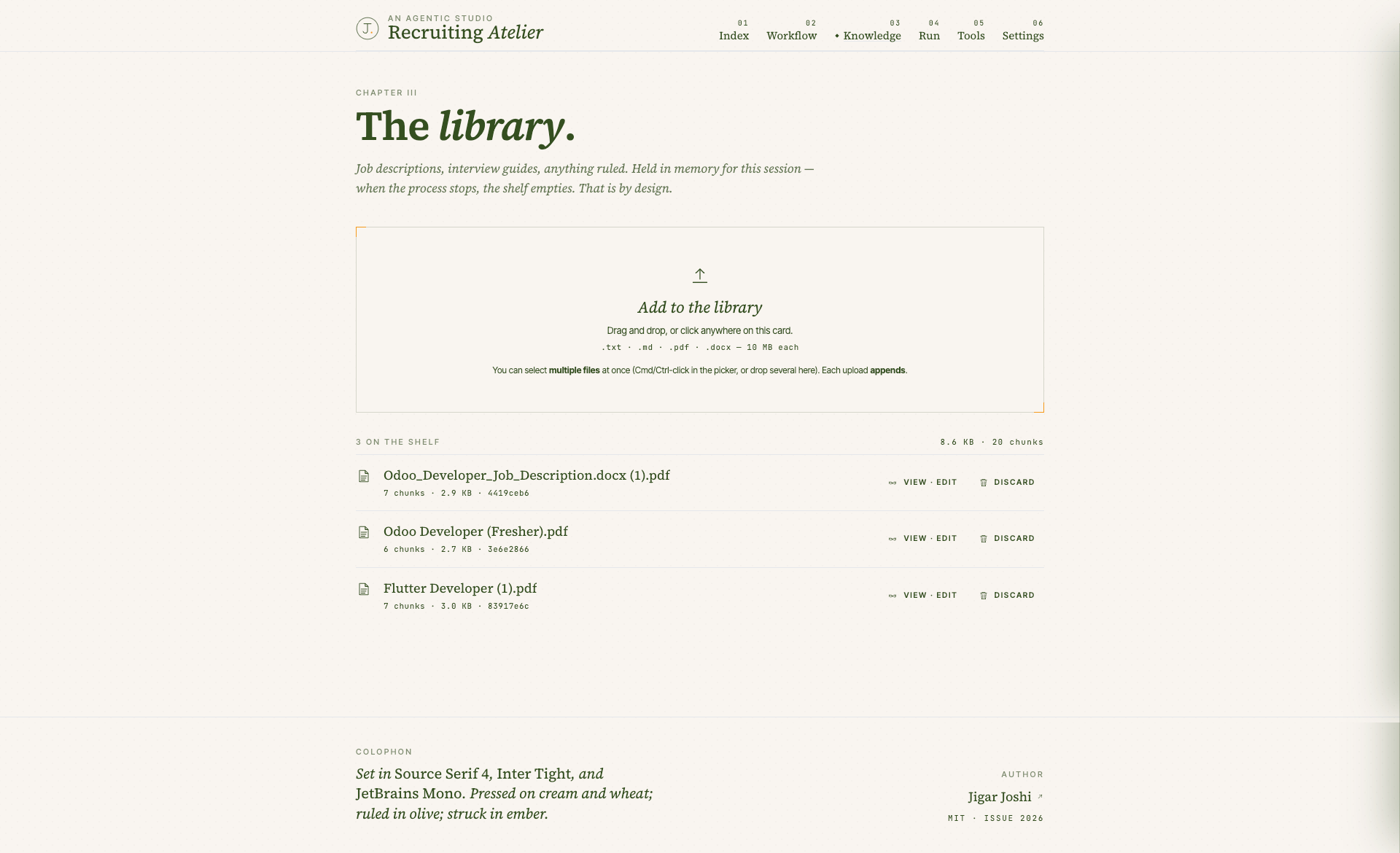
The KB chapter is the studio’s RAG layer. Drop job descriptions and interview guides on the page. They get chunked, embedded, and stored in an in memory Chroma EphemeralClient. The screener and the scorer retrieve relevant chunks at run time and the supervisor splices them into the prompts.
Two design choices worth calling out. The KB is in memory by default. A backend restart wipes it. That is the right default for a learning impl. You cannot accidentally retain candidate PII you forgot about, and the setup tax is zero. If you want persistence in production, swap EphemeralClient for PersistentClient and update update_text accordingly. The interface stays the same. Twenty lines of change against rag/knowledge_base.py.
The second is the rich text editor. The KB drawer is a TipTap WYSIWYG (bold, italic, underline, strike, H1 to H3, lists, blockquote, code block, undo, redo). On commit, the document is re chunked, re embedded, and the doc id is preserved. Preserving the id matters because every agent run pins to the version of the document it retrieved. Change the doc, the next run sees the new chunks, but old runs in the shortlist history still resolve correctly.
Multi dimensional scoring with the math in Python
Diya scores four dimensions: skills, experience, education, communication. Each one is a zero to one hundred score from a separate LLM call with its own Pydantic guardrail. The overall is computed in Python from the user configurable weights in /settings. This is on purpose. If the overall came from the model, every score would be impossible to defend. Doing the weighting in Python makes the math auditable and the weights tunable from the UI.
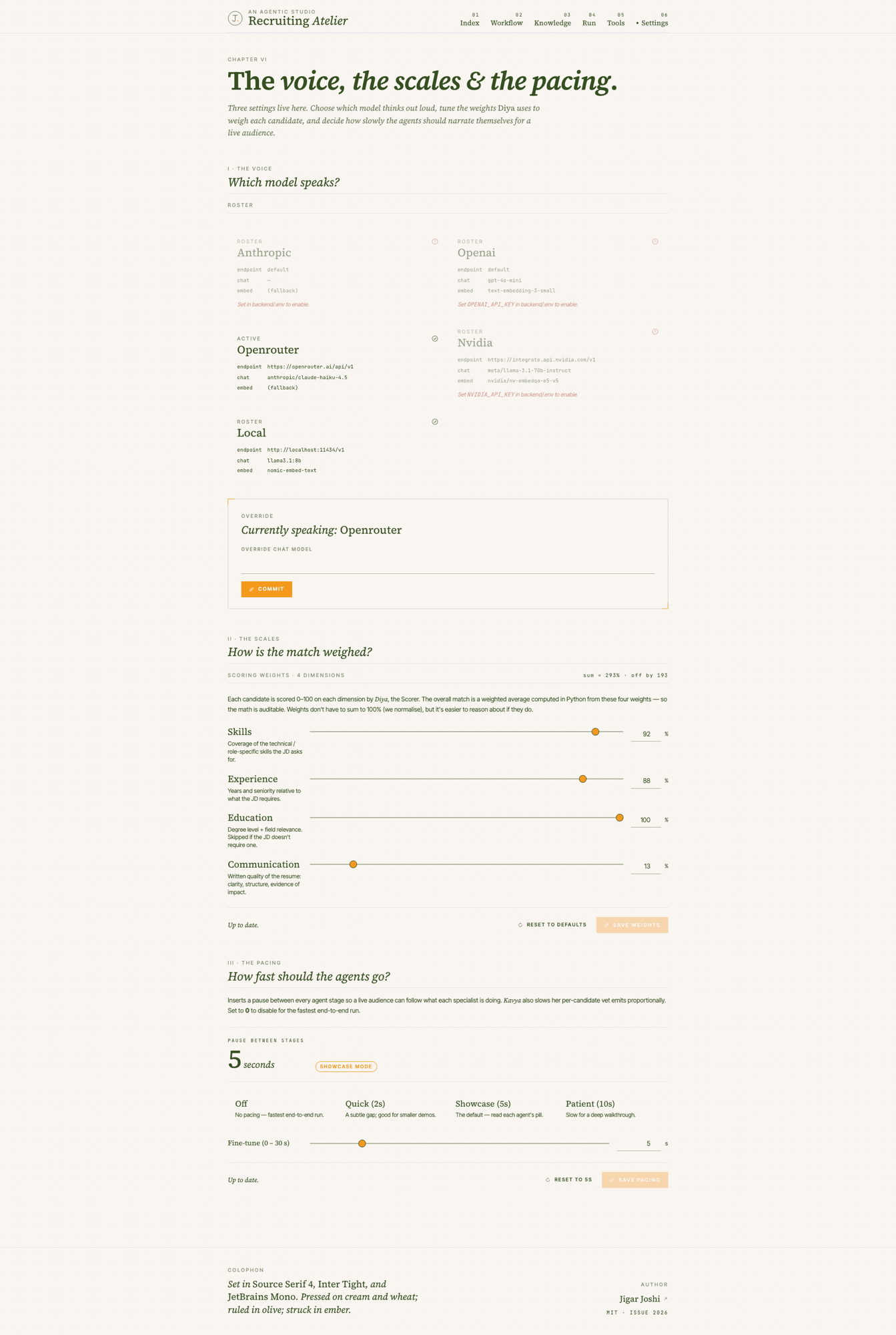
The settings page also exposes provider switching. Anthropic, OpenAI, OpenRouter, NVIDIA NIM, and a local Ollama. Only the providers whose API key is configured show as enabled. Switching is at runtime, not a build flag. The factory in backend/llm/ returns a provider adapter that satisfies a single chat interface, so the rest of the system never knows or cares which model answered.
The fourth lever is pacing. Zero to thirty seconds of pause between agent stages, configurable from the settings page. Five seconds by default. It is there for live demos. When you walk a room through what the system is doing, you need each Awaiting then In hand then Set transition to be visible to the audience. Run it at zero in production.
A live run, end to end
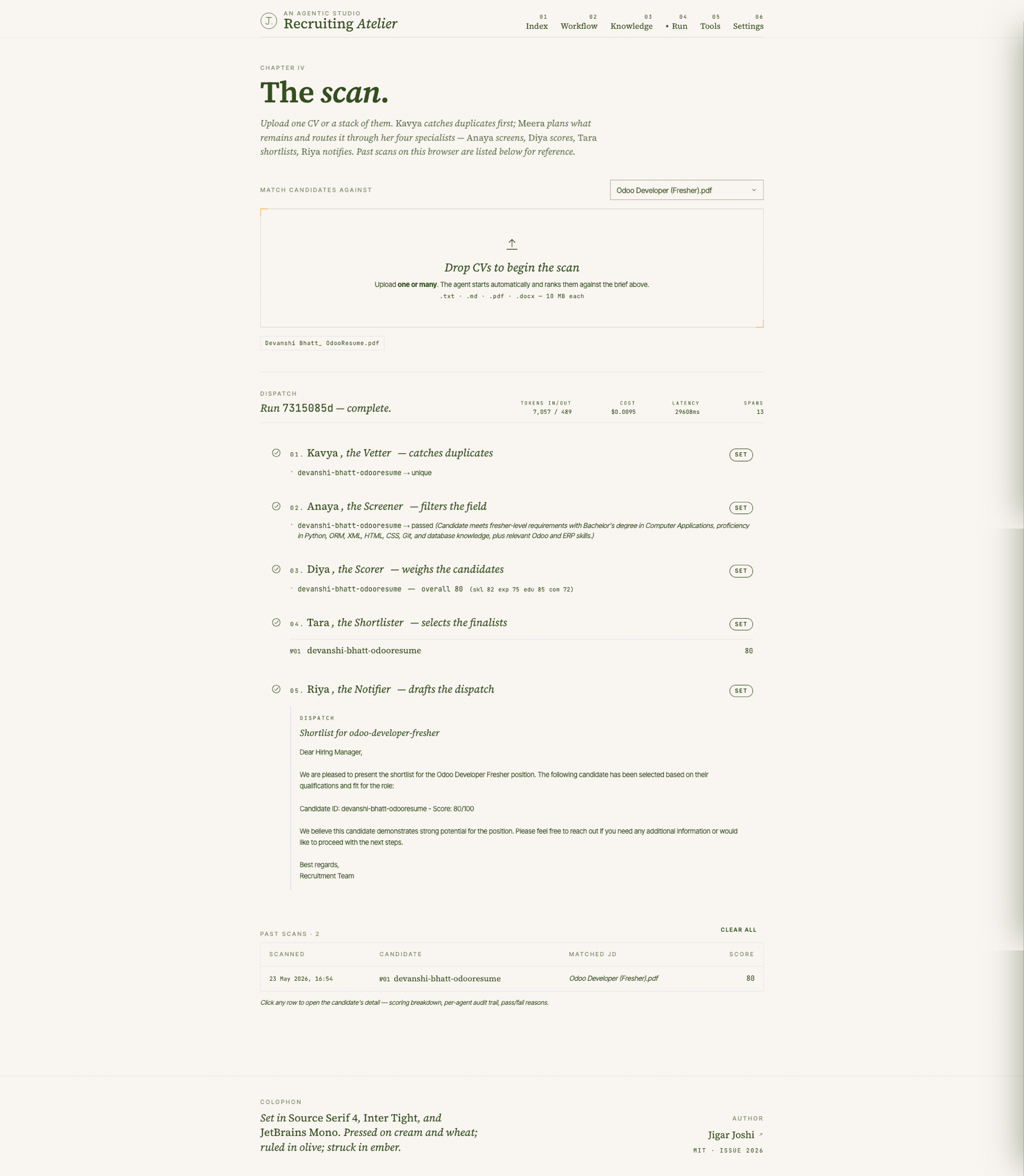
Open /run with at least one JD in the library. Drop a CV. The moment the file lands, the pipeline fires. The cast strip animates through the phases. The status pills move from Awaiting to In hand to Set. Past scans accumulate in a table at the bottom. Click any row and a right side drawer opens with the candidate detail: a bar chart of the four dimension breakdown, a per agent audit trail, the run context table.
- 01CV dropFile lands on the drop zone. Extracted to plain text via pypdf or python docx with a reflow step to repair the one fragment per line output some PDFs produce.
- 02Kavya vetsSHA 256 hash plus email lookup against the persistent .seen-resumes.json. Duplicate or new.
- 03Meera plansNumbered step plan. Available to read in the trace afterwards.
- 04Anaya screensSingle binary call. Pass or fail against the JD must haves.
- 05Diya scoresFour separate calls, four guardrails, one Python weighted overall.
- 06Tara shortlistsRanks the survivors, takes top N (default three, override per run).
- 07Riya draftsHiring manager email. Mocked send in the reference impl, real dispatch when wired to your transport.
- 08History rowPer browser localStorage entry. Click to inspect the full audit trail.
Guardrails, observability and the production seams
Every LLM call validates its output against a Pydantic schema. If the model returns malformed JSON or a field with the wrong shape, the guardrail catches it and retries. Three retries by default before the run errors out. The retry policy is in one place, not scattered across agents.
Observability is Langfuse if you set the keys, in memory plus print otherwise. Every run gets a token, latency and cost summary at /api/v1/run/{run_id}/summary. The trace tree at /api/v1/run/{run_id}/trace shows the full span hierarchy when Langfuse is off. The point is that the trace exists even when you have not wired up your tracing vendor yet, which is the realistic state of most teams during the first iteration.
The repo is honest about what it is not. No auth. No rate limiting. No secrets manager. Singletons in process so it does not scale horizontally. Browser local scan history. One integration test (a deterministic FakeLLM running the full ReAct loop offline). The README lists every intentional non goal and the reasonable next step for each. Containerise, move the run queue to Redis, move shortlists to Postgres, add bearer token middleware, finish the Langfuse trace tree. None of that is hard against this codebase because the seams are already in place.
What you can copy
If you take three things from the repo into your own work, take these.
- The tool registry pattern: TOOLS list with hand written JSON Schema, TOOL_MAP dict, single register_module call. Tools are data, not code paths.
- The supervisor that plans before it acts: a numbered step plan, recorded in the trace, before any tool gets called. Cuts retries and makes the trace readable.
- The Pydantic plus Zod boundary: one schema definition per wire contract, mirrored across the language boundary, enforced at both ends. Drift gets caught at build time, not in production.
The rest of the codebase is opinionated about smaller things: editorial UI rather than a generic Tailwind UI Kit dashboard, hand drawn inline SVG icons rather than Lucide, source serif 4 plus inter tight plus jetbrains mono rather than the default Vercel font stack. Those are aesthetic choices and you should override them. The architecture choices are not aesthetic. They are the ones I make on real client engagements. If you want me to help you adapt this pattern to your domain, that is the agentic AI consulting engagement: a half day to walk your current system, an architecture plan, then the hardening passes against your real data. For the broader pillar this work sits inside, see multi-agent systems.
Pull the repo, run make dev, watch one run on /run, then open backend/runner.py and read the ninety lines. If that does not make ReAct loops obvious, I want to hear what slipped. The repo is MIT licensed. Fork it, harden it, use it commercially. The only thing I ask is that you keep the copyright notice and tell me how you used it.
Agentic AI patterns, delivered Thursdays
What I am shipping, watching, and pruning out of client stacks each week. One email. No fluff.