Your agents aren't broken, your tools are: three questions to ask before you build one
When an agent misbehaves, almost everyone reaches for the prompt or the model. The fault is usually further down, in a tool that does too much, lies when it fails, or buries the answer in a wall of raw data. An AI tool is not a function. It is a contract the model has to trust. Here are the three questions I run before writing a single line of any tool.
 Jigar JoshiAgentic AI Architect and Consultant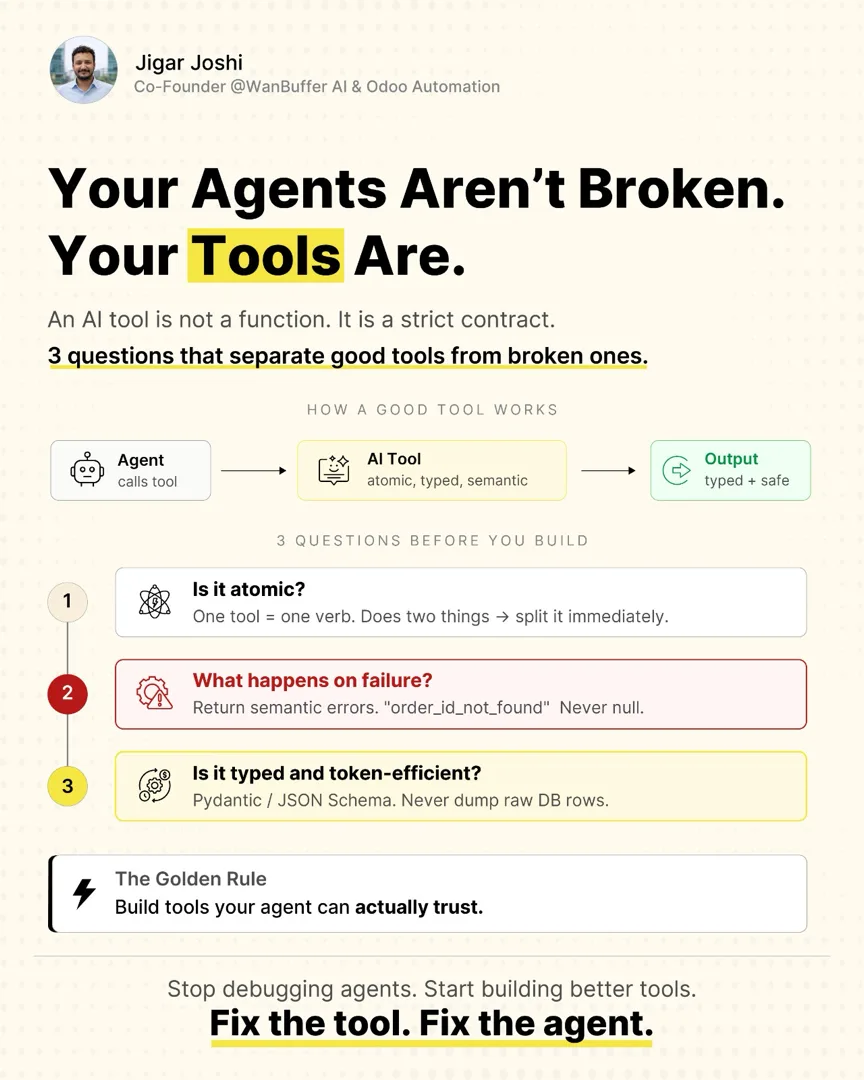
In this post (5 sections)
A client called me last month because their support agent kept doing the wrong thing. It would look up an order, then sometimes refund it, sometimes not, sometimes refund the wrong one. They had rewritten the system prompt four times. They had upgraded the model. They had added more examples. The behaviour got marginally better and then drifted right back. By the time I got on the call they were convinced the model was the problem.
It was not the model. They had a tool called manage_order that could look up, refund, cancel, and update an order depending on which parameters you passed. The model had to decide, every single turn, which of those four things it was trying to do, and encode that decision into a parameter combination. It got the decision wrong often enough to look like the model was unreliable. The model was fine. The tool was broken.
This is the most common bug I see in production agentic systems, and it almost never gets diagnosed as a tool problem. An AI tool is not a function you happen to expose to a model. It is a contract. The model reads the contract, trusts it, and acts on it. If the contract is vague, dishonest, or bloated, the agent built on top of it cannot be reliable no matter how good the model is. Stop debugging the agent. Start auditing the tool.
Three questions separate a tool the model can trust from one that quietly sabotages it. I run all three before I write a line of the implementation. They are not style preferences. Each one maps to a specific failure mode I have watched cost teams weeks.
Question one: is it atomic?
One tool, one verb. If a tool does two things, you have already lost. The manage_order tool above did four. The fix was four tools: get_order, refund_order, cancel_order, update_order. Each one does exactly one thing and the name says what that thing is. The wrong-action rate dropped to near zero the same afternoon, with no change to the prompt or the model.
The reason is mechanical, not magical. When a tool maps to one verb, the model's decision is "do I want to refund or not". That is a clean choice it makes well. When a tool maps to several verbs behind a parameter flag, the model has to first decide what it wants and then translate that into the right combination of arguments. You have added a translation step, and translation steps are where models drift. Every parameter that changes what the tool fundamentally does is a place the model can pick wrong.
The test is simple. Write the tool description in one sentence. If you need the word "and" to describe what it does, split it. get_order_and_refund is two tools wearing one name. This is the same instinct behind the one rule I keep coming back to for tool design, applied at the moment of first definition rather than during a cleanup.
Question two: what happens on failure?
This is the question almost nobody asks, and it is the one that produces the strangest agent behaviour. When a tool fails, what does it return? If the answer is null, an empty string, or a generic 500, you have a problem. The model receives nothing it can act on, and a model handed nothing will invent a reason. That invented reason is what your users see as a hallucination.
Return semantic errors. If someone asks for order 12345 and it does not exist, the tool should return order_id_not_found, not null. The difference is enormous. order_id_not_found tells the model exactly what went wrong and lets it recover: it can ask the user to recheck the number, or look the order up a different way. null tells the model nothing, so it fills the gap with a plausible-sounding story about why the order could not be found, and that story is fiction.
# Broken: the model has no idea what happened
def get_order(order_id: str):
    row = db.fetch(order_id)
    return row  # None when not found → model invents a reason

# Better: a semantic error the model can act on
def get_order(order_id: str) -> OrderResult:
    row = db.fetch(order_id)
    if row is None:
        return OrderResult(ok=False, error="order_id_not_found",
                           message=f"No order with id {order_id}.")
    return OrderResult(ok=True, order=Order.from_row(row))
The rule of thumb: every failure a tool can have should be a named, readable outcome, not an absence. Think of the error string as a message to the model, because that is exactly what it is. order_id_not_found, rate_limited, insufficient_permissions, ambiguous_match. Each one points the model at a different recovery path. A null points it at a cliff. This is one half of why tool descriptions are prompts and the registry is where most agents quietly break: the model reads everything the tool emits, including its errors, as instruction.
Question three: is it typed and token-efficient?
A tool with no schema is a tool the model has to guess about. Define the input and the output with Pydantic or JSON Schema. The schema does two jobs at once. It tells the model exactly what shape of argument to send, which removes a whole class of malformed-call errors. And it lets you validate what comes back, which is where guardrails hook in. A tool that returns a typed object can be checked. A tool that returns a free-form string cannot.
The second half of this question is the one that quietly drains budgets: never dump raw database rows into the context. I see this constantly. A tool runs SELECT * and hands the model a forty-column row when the model needed three fields. The other thirty-seven columns are noise that makes the model's job harder, and every one of them costs tokens on every single call. On a high-volume agent that is real money, and it is money spent making the agent worse.
| Dimension | Broken tool | Tool the model can trust |
|---|---|---|
| Scope | manage_order does lookup, refund, cancel, update | get_order does one thing; siblings do the rest |
| Failure | Returns null when the order is missing | Returns order_id_not_found with a readable message |
| Shape | Returns the raw 40-column DB row | Returns a typed Order with the 6 fields that matter |
| Token cost | High and constant on every call | Low; only the fields the model uses |
| Model behaviour | Drifts, invents reasons, picks wrong action | Picks the verb, reads the error, recovers cleanly |
Return the projection the model actually needs. For get_order that might be the id, status, total, customer email, item count, and created date. Six fields, typed, named. The model reads it instantly and the call is cheap. If a later step needs more, that is a different tool with its own contract. Shaping tool output to the model's actual need is a recurring theme in tool registry design for agentic AI, which is the audit I run across an entire codebase once the individual tools are right.
The golden rule underneath all three
Atomic, honest on failure, typed and lean. Three questions, but they collapse into one idea: build tools your agent can actually trust. A trustworthy tool does one thing, tells the truth when it cannot, and hands back exactly what was asked for in a shape that can be checked. An agent standing on tools like that is reliable almost by default. An agent standing on tools that fail any of the three is fragile no matter how much you tune the prompt.
This is why I get suspicious whenever someone tells me their agent is unreliable and their fix is a longer system prompt. The prompt is rarely the lever. Pull up the tool definitions instead. Nine times out of ten there is a manage_everything tool, a function that returns null on the unhappy path, or a SELECT * feeding the model a row it has to wade through. Fix the tool and the agent you thought was broken starts behaving.
Where this fits
Tool design is the layer most teams under-invest in and then pay for in debugging time. It sits at the centre of the broader agentic AI work, and it is the first thing I audit on any agentic AI consulting engagement, before touching orchestration or prompts. If your agents are misbehaving, run the three questions over every tool they can call. Most of the time the bug was never in the agent at all. Fix the tool. Fix the agent.
Agentic AI patterns, delivered Thursdays
What I am shipping, watching, and pruning out of client stacks each week. One email. No fluff.