The anatomy of an AI agent: memory, tools, the loop, and guardrails
Strip the hype off an AI agent and four parts are left: a memory, a set of tools, a loop that decides what to do next, and a guardrail that vets every action before it runs. Here is what each part is for, the order they fail in, and where I have written about fixing each one.
 Jigar JoshiAgentic AI Architect and Consultant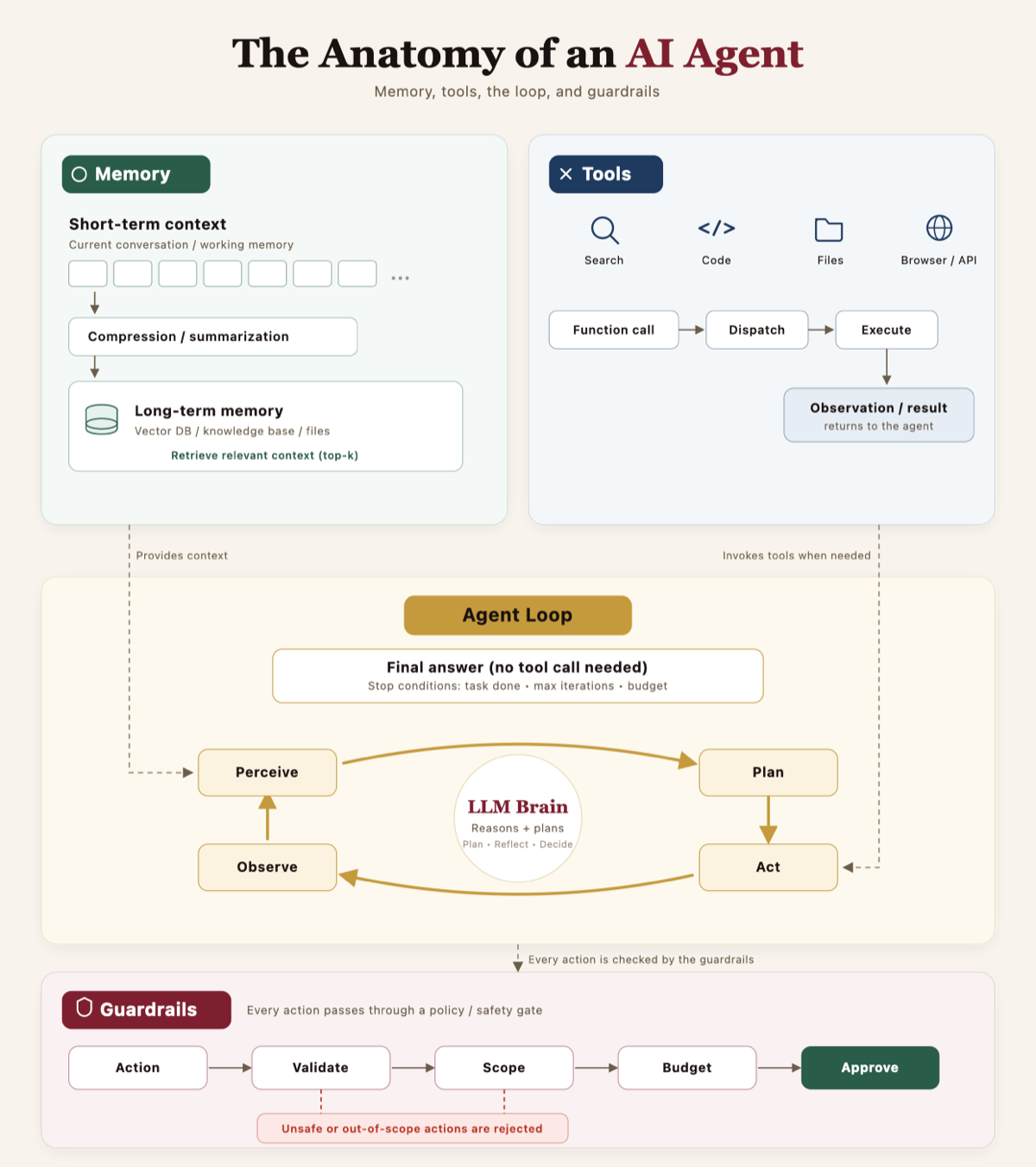
In this post (6 sections)
I get sent a lot of agent diagrams. Most of them draw the model in the middle with arrows radiating out to tools, and call it an architecture. It is not wrong, it is just missing the parts that decide whether the thing actually works in production. When a client says "our agent is unreliable," the model is almost never the problem. The problem is in the memory, the tools, the loop, or the guardrails, and the useful skill is telling them apart at a glance.
So here is the anatomy I draw on the whiteboard at the start of every engagement. Four parts. The model sits at the center of one of them and does less than people think.
Memory: the agent's sense of the past
Memory is two different things that get collapsed into one word. There is short-term context, which is the working memory of the current conversation: what the user said, which tools got called, what came back. And there is long-term memory, an external store (a vector database, a knowledge base, a pile of files) that the agent retrieves the relevant slice from per request. Between the two sits a step almost everyone skips, which is compression: summarizing old turns so the live context does not grow until things fall off the end and the agent "forgets" something it actually saw.
The mistake I see most often is a team building the long-term store, calling it "memory," and wondering why the agent cannot remember what the user said three turns ago. A vector store is not an agent's memory of a conversation, and bolting user state into the same store that holds your reference docs leaks data across users. I pulled that distinction apart in the vector store is not your agent's memory, and the durable, per-project version of it is in persistent memory for coding agents.
Tools: how the agent touches the world
Tools are the verbs. Search, run code, read a file, call an API. The mechanics are a small pipeline: the model emits a function call, the runtime dispatches it, the tool executes, and the result comes back as an observation the model reads on the next turn. That observation loop is the entire reason an agent can do anything beyond talk.
The part that decides whether tools work is not the execution, it is the selection. The model picks a tool by reading the description string you wrote for it, nothing else. Vague descriptions and a bloated registry are the most common cause of an agent that "uses the wrong tool," and the fix lives in the registry, not the model. Three posts cover the whole surface: tool registry design for agentic AI for the structure, tool descriptions are prompts for the writing, and one tool, one purpose for the single rule that prevents most confusions.
The loop: perceive, plan, act, observe
This is the engine. The model perceives the current state, plans a next step, acts by calling a tool, observes the result, and goes around again. The loop is also where the model earns the word "agent": it is not answering once, it is deciding, repeatedly, whether it is done. People obsess over the planning quality. I obsess over the exit.
Look at the stop conditions in any loop. Task done, max iterations reached, budget spent. A loop without an explicit budget is the single most common way I have watched a production agent burn money, because "iterate until satisfied" has no guaranteed stopping point and the model is a poor judge of its own completion. Every loop needs a step budget, a success check that does not just trust the model's self-report, and a typed failure the calling code handles. I wrote the long version in why your agent keeps failing after 3 steps. When the loop spans more than one agent, the orchestration choice matters too, which is supervisor pattern versus handoffs.
Guardrails: every action through a gate
The fourth part is the one demos leave out and production cannot. Before any action actually runs, it passes through a policy gate: validate the action is well-formed, check it is in scope, check it is within budget, then approve or reject. Anything unsafe or out of scope gets rejected before it touches a real system. The guardrail is not the model being careful. It is code around the model that does not trust the model.
This box is also a security boundary, not just a safety one. Every tool, skill, and memory engine an agent can reach executes with the privileges you granted it, which is exactly the surface that keeps getting hit. The guardrail is where you enforce least privilege at runtime. I made that argument in full in your agent's supply chain is the attack surface now.
The four parts, and how each one fails
The reason this anatomy is worth holding in your head is diagnostic. Almost every vague "the agent feels dumb" report maps cleanly onto one box.
Notice that the model is not a row. It sits inside the loop, reasoning and planning, and it matters, but swapping it for a stronger one fixes none of the four failures above. That is why "let us upgrade to a bigger model" is so often the wrong first move. The bigger model still forgets the conversation, still reads your vague tool descriptions, still runs away without a budget, and still needs a gate in front of it.
How to use this when something breaks
Next time an agent misbehaves, do not start at the model. Ask which box. Does it lose track of what the user said? Memory, specifically the short-term and consolidation layers. Does it call the wrong function? Tools, specifically the registry. Does it spin or quit early? The loop and its exit conditions. Did it do something it should not have been allowed to? Guardrails. One question, four answers, and each answer points at a different fix and usually a different person on the team.
One more framing that saves a lot of scoping arguments: this anatomy is what separates an actual agent from a single model call with tools bolted on. If there is no loop with real stop conditions and no guardrail gate, you have a workflow, not an agent, and that is often the better choice. I drew that line in AI agent vs agentic AI: what the distinction actually means.
Agentic AI patterns, delivered Thursdays
What I am shipping, watching, and pruning out of client stacks each week. One email. No fluff.